User guide
Account
The administrator has the ability to create multiple accounts of different types.
There are 4 types of accounts that can be created:
There are 4 types of accounts that can be created:
Chief Executive Officer, Merchant Account, Multimerchant Account and Staff Account.
A Chief Executive Officer Accountis an administrator account to which the administrator functions are enabled except for the ability to create other administrator accounts and the ability to view subscription payment details. The CEO account will be able to create merchant accounts, multimerchant accounts and Staff accounts.
A Account Merchant is an account which is given the possibility to manage a Merchant and related actions, such as managing reservations and resources, inserting new discounts and additional services.
A Account Multimerchant it is an account to which more than one merchant are associated, for example an account dedicated to a hotel chain.
How to access the list of accounts and create a new one: Settings -> Account -> +New
The new account personalization page will be as follows: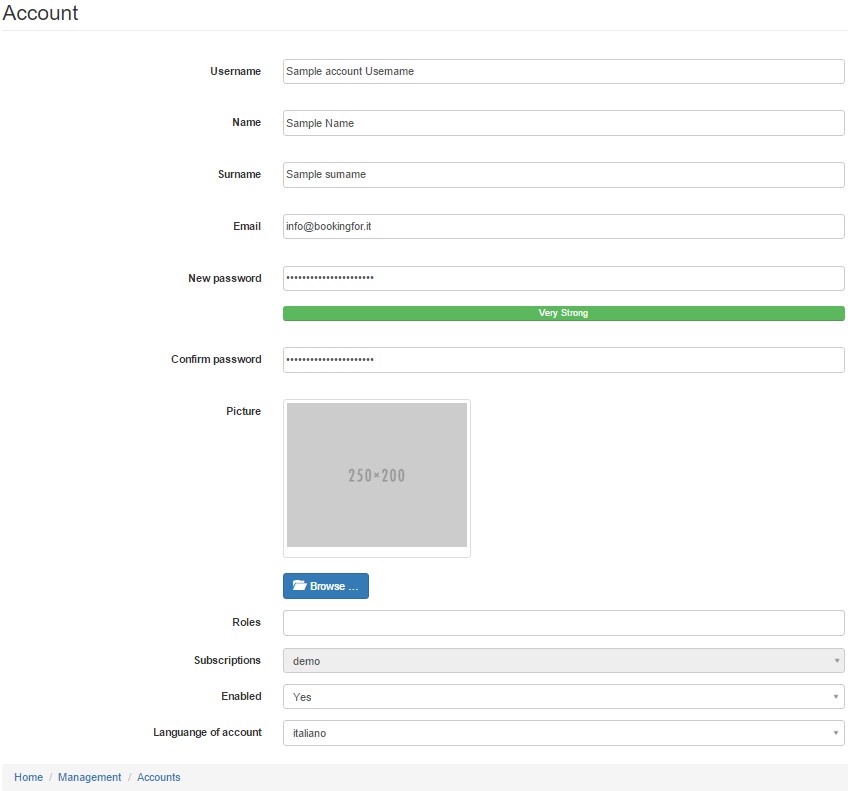
Complete the text fields according to your needs.
Selecting the “Role” field a dropdown menu will open as follows:
Selecting the “Role” field a dropdown menu will open as follows:

Select the desired role for the new account taking into account the above regarding the diversification of roles
A Account Staff is an account which is given the possibility to manage a Merchant but with limited functionality.
A Account Staff is an account which is given the possibility to manage a Merchant but with limited functionality.
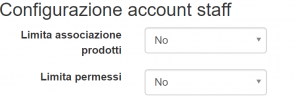
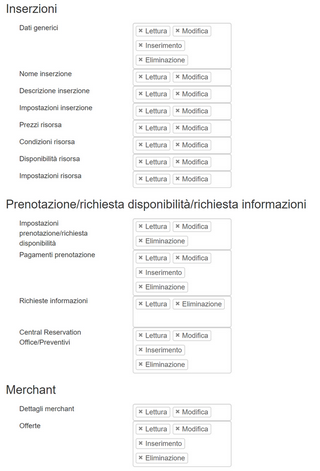
IIn particular, it will be possible to assign to the Staff a limited list of resources and / or intervene on the permissions with the relative actions (reading, modification, insertion and deletion) in the three main sections
- Ads
- Booking / availability request / information request
- Merchant