Offers (Discounts and supplements)
How do I reach this section?
From the main menu: Ads -> Resources
Offers (discounts / supplements) can be delegated to the merchant and / or to the subscription. A merchant will then have the ability to manage their Offers (discounts / supplements) as well as the subscription administrator will be able to create their own and apply them to one or more merchants.
Below is the detail of a discount:
Settings
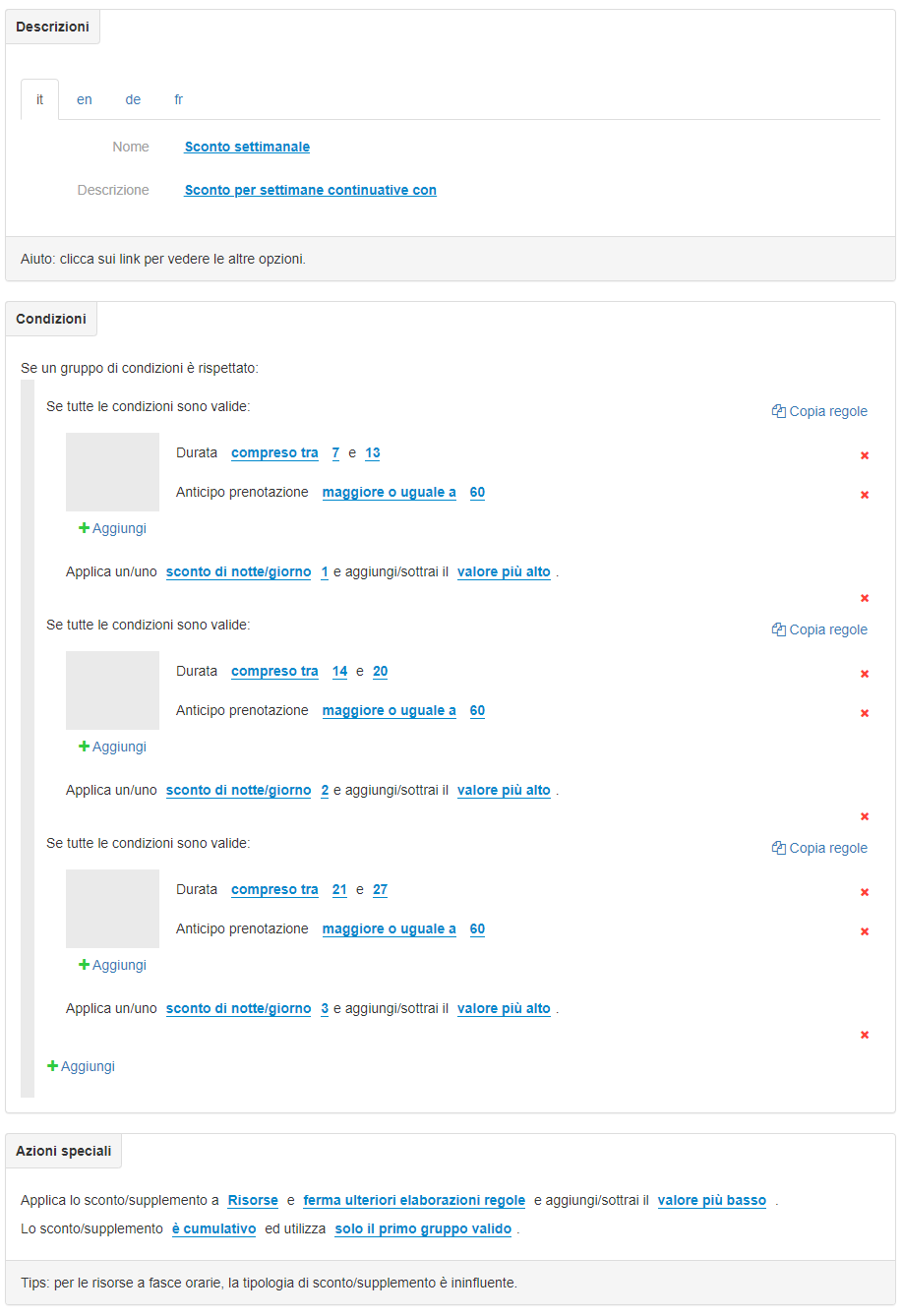
This page is divided into 3 blocks: the Description of the offer, the Conditions of Application and the Special Actions.
- 1. Descriptions
Here you can enter the name and description of the offer for each language. - 2. Conditions
Set of groups of conditions that must occur for the rule to be applied and the corresponding actions.
The main rules that can be set are:- Length of stay
- Length of stay
- Days in advance booking
- Check-in day
- Bed position
- Number of people
- Tariff category
- Contact category
- Resource
- Age groups
- Reservation date
- …
- discount per night / day / unit of €
- supplement per night / day / unit of €
- percentage discount per night / day / unit of
- percentage surcharge per night / day / unit of
- night / day discount
- fixed discount of €
- fixed supplement of €
- 3. Special Actions
If at least one group of conditions are met then the system applies what is reported in this block. Assign scope, application methods, and Offer characteristics (Discounts / supplements)
You can apply:- The discount / supplement to Resources, people and meals
- Stop or continue further processing of Offers (Discounts / supplements) deciding on the basis of supplements or discounts whether to add or subtract the most suitable value from the Discounts / supplements useful in case you want to create cumulative Discounts / supplements with other Offers (Discounts / supplements)
- Apply the cumulus between the groups of conditions;
- Limit the discount / surcharge to the first group of valid conditions or to all groups of valid conditions;
- In case of Offer (Discounts / supplements) of the subscription, it will be possible to choose whether to apply them before or after the Offers (Discounts / supplements) of the individual merchants
Average
In this section it is possible to insert one or more photos concerning the offer.
The recommended values are: jpg format – dimensions 1280 x 1024 px.
Some examples:
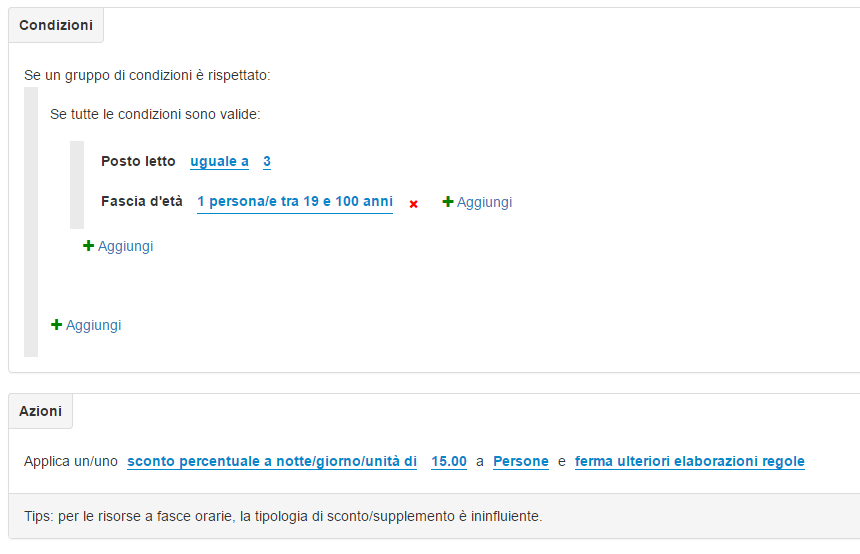
Extrabed Discount: Sometimes you prefer to use discount logic instead of using price management
In the Description block: enter any text in the “Name” and “Description” fields;
In the Conditions block: in the “Rules” select the item “Bed” and then for example the value 3 to apply the discount to the third bed; and the “Age range” rule and then for example “1 person between 18 and 100 years old” – to limit the discount to adults only.
Finally, in the “shares” specify the amount of the discount.
In the Special Actions block: Apply the discount / supplement to People and stop further rule processing and add / subtract the lower value. The discount / supplement is cumulative and uses only the first valid group.
below the example image:
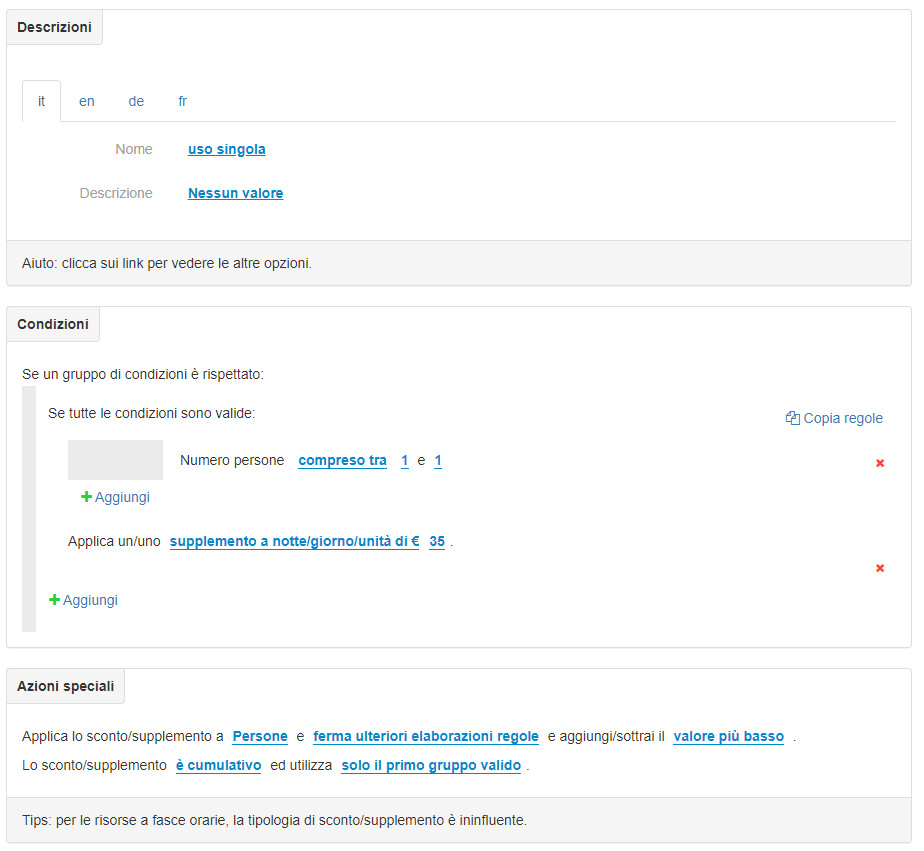
Single use supplement:
In the Description block: enter any text in the “Name” and “Description” fields;
In the Block Conditions: in the “Rules” select the item “Number of people” and then select “between” and enter the value 1 in both fields and finally apply the supplement per night / day / unit of € .;
In the Special Actions block: Apply the discount / supplement to People and stop further rule processing and add / subtract the lower value. The discount / supplement is cumulative and uses only the first valid group.
below the example image: