The term “Product category” refers to the type of product that is attributed to a resource during creation, and which can be inserted as a filter during a search by the user.
For example, once a product category called “Bungalow” has been instantiated, the bungalow type can be selected from the resource creation menu, and the user will be able to filter the search for resources that have been categorized as “Bungalow”.
How to access the Product Categories menu and create a new one: Subscriptions -> Product Categories -> +New
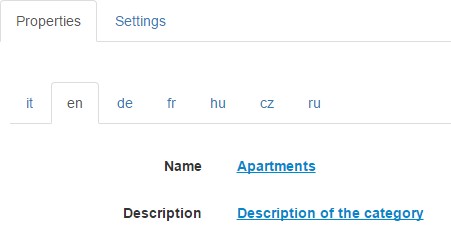
The customization page of the new product category will be as follows:
Fill in the Properties section as desired and go to the Settings section
Select the parent category that the category you are creating refers to
Select the type of product you are creating (If Bookable or On Sale)
Privacy Policy di www.bookingfor.com
Questa Applicazione raccoglie alcuni Dati Personali dei propri Utenti.
Dati personali raccolti per le seguenti finalità ed utilizzando i seguenti servizi:
Accesso agli account su servizi terzi
Accesso all’account Google Drive e Accesso all’account Dropbox
Dati Personali: varie tipologie di Dati secondo quanto specificato dalla privacy policy del servizio
Contattare l’Utente
Modulo di contatto
Dati Personali: varie tipologie di Dati secondo quanto specificato dalla privacy policy del servizio
Gestione contatti e invio di messaggi
MailUp
Dati Personali: email
Gestione dei pagamenti
PayPal
Dati Personali: varie tipologie di Dati secondo quanto specificato dalla privacy policy del servizio
Gestione dei tag
Google Tag Manager
Dati Personali: Cookie; Dati di utilizzo
Hosting ed infrastruttura backend
iubenda Consent Solution
Dati Personali: Dati comunicati durante l’utilizzo del servizio
Interazione con le piattaforme di live chat
Widget di Tawk.to
Dati Personali: Cookie; Dati comunicati durante l’utilizzo del servizio; Dati di utilizzo
Ottimizzazione e distribuzione del traffico
Cloudflare
Dati Personali: Cookie; varie tipologie di Dati secondo quanto specificato dalla privacy policy del servizio
Sucuri CloudProxy
Dati Personali: varie tipologie di Dati secondo quanto specificato dalla privacy policy del servizio
Protezione dallo SPAM
Google reCAPTCHA
Dati Personali: Cookie; Dati di utilizzo
Registrazione ed autenticazione
Registrazione diretta
Dati Personali: CAP; città; Codice Fiscale; cognome; email; ID Utente; indirizzo; indirizzo di fatturazione; lingua; nazione; nome; numero civico; numero di telefono; Partita IVA; password; prefisso; provincia; ragione sociale; sito web; stato; username; varie tipologie di Dati
Google OAuth
Dati Personali: varie tipologie di Dati secondo quanto specificato dalla privacy policy del servizio
Statistica
Google Analytics, Yandex Metrica e Hotjar Form Analysis & Conversion Funnels
Dati Personali: Cookie; Dati di utilizzo
Visualizzazione di contenuti da piattaforme esterne
Google Fonts
Dati Personali: Dati di utilizzo; varie tipologie di Dati secondo quanto specificato dalla privacy policy del servizio
Widget Google Maps e Widget Video YouTube
Dati Personali: Cookie; Dati di utilizzo
Informazioni di contatto
Titolare del Trattamento dei Dati
IPERTRADE SRL – Via del progresso, 30 – 35127 Padova (Italia)Dati Personali: Cookie; Dati di utilizzo
Responsabile per la Protezione dei Dati (DPO)
ePrivacy Consultants
Rappresentato da Alberto Bottacin
Via del progresso, 30 – 35127 Padova (Italia)
dpo@ipertrade.com
Indirizzo email del Titolare:
ipertrade@ipertrade.com
This Application collects some Personal Data of its Users.
Personal data collected for the following purposes and using the following services:
Access to accounts on third party services
Access to the Google Drive account and Access to the Dropbox account
Personal Data: various types of Data as specified in the privacy policy of the service
Contact the user
Contact form
Personal Data: various types of Data as specified in the privacy policy of the service
Manage contacts and send messages
MailUp
Personal Data: email
Payment management
PayPal
Personal Data: various types of Data as specified in the privacy policy of the service
Tag management
Google Tag Manager
Personal Data: Cookies; Usage data
Hosting and backend infrastructure
iubenda Consent Solution
Personal Data: Data communicated while using the service
Interaction with live chat platforms
Tawk.to widget
Personal Data: Cookies; Data communicated while using the service; Usage data
Traffic optimization and distribution
Cloudflare
Personal Data: Cookies; various types of data as specified in the privacy policy of the service
Sucuri CloudProxy
Personal Data: various types of Data as specified in the privacy policy of the service
SPAM protection
Google reCAPTCHA
Personal Data: Cookies; Usage data
Registration and authentication
Direct registration
Personal Data: CAP; city; Fiscal Code; surname; e-mail; User ID; address; billing address; tongue; nation; first name; House number; telephone number; VAT number; password; prefix; province; business name; website; state; username; various types of data
Google OAuth
Personal Data: various types of Data as specified in the privacy policy of the service
Statistics
Google Analytics, Yandex Metrica and Hotjar Form Analysis & amp; Conversion Funnels
Personal Data: Cookies; Usage data
Viewing content from external platforms
Google Fonts
Personal Data: Usage Data; various types of data as specified in the privacy policy of the service
Google Maps Widget and YouTube Video Widget
Personal Data: Cookies; Usage data
contact info
Data Controller
IPERTRADE SRL – Via del progresso, 30 – 35127 Padova (Italia) Personal Data: Cookies; Usage data
Responsible for Data Protection (DPO)
ePrivacy Consultants
Represented by Alberto Bottacin
Via del progress, 30 – 35127 Padua (Italy)
dpo@ipertrade.com